WinSpirit KYC and Account Verification
 Available in US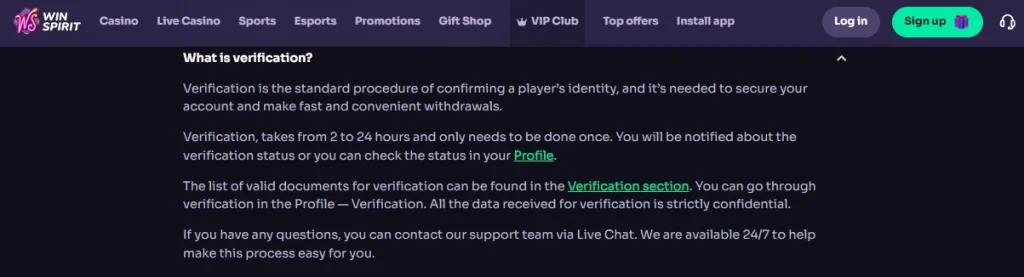
WinSpirit uses identity verification as part of account security and the withdrawal process. Its current official FAQ says verification is used to confirm a player’s identity, protect the account and support withdrawals, and states that the process normally takes 2 to 24 hours. Treat that timing as a current operator estimate rather than a guaranteed completion deadline for every Australian account. For broader product and regulatory context, see the main review.
The most important point is account-specific verification. WinSpirit says the valid-document list appears in the Verification area of the player’s profile, so the authenticated account provides the relevant request for each Australian user. Prepare for identity and payment-ownership checks, follow the live instructions shown to the account, and send documents only through official channels.
Table of Contents
- What WinSpirit verification is for
- Identity verification and payment-method ownership are different checks
- Where the current document list should come from
- The official 2 to 24 hour statement
- How verification can interrupt a withdrawal
- Prepare the account before a verification request arrives
- How to recognise a legitimate verification request
- What to do if a document is rejected
- Verification and privacy
- Australian users should separate KYC from licensing
- KYC checklist before requesting a withdrawal
- FAQ
What WinSpirit verification is for
KYC, short for know-your-customer verification, is an identity-control process rather than a bonus feature. WinSpirit’s official FAQ describes verification as the standard procedure for confirming a player’s identity. In practical terms, the check connects the person using the account with the personal details and payment activity attached to it.
For users, verification matters most at the point where funds move out of the account. The same FAQ says an unverified account can block a withdrawal and lists a new or unverified payment system or card as another potential cause of withdrawal difficulty. Those two points show why identity verification and payment-method verification work as related but separate checks.
Accurate registration details reduce later friction. Verification requests vary by account, so the practical focus is recognising a legitimate request and understanding how it can affect payout readiness.
Identity verification and payment-method ownership are different checks
An identity check asks whether the account belongs to the person whose details were registered. A payment-method ownership check asks whether a card, wallet or other funding route is genuinely controlled by that account holder. These checks can overlap, but they answer different questions.
That distinction matters because a player can complete identity verification and still encounter a payment-related request after adding a new card or withdrawal method. WinSpirit’s FAQ specifically lists a new payment system or a new card awaiting verification as a reason funds may be held until the additional check is complete.
For practical planning, keep payment records that establish ownership while limiting unnecessary personal information. If a verification screen requests proof connected to a payment method, follow only the instructions displayed in the authenticated account or confirmed by verified support. Treat each method-specific request on its own terms.
Where the current document list should come from
The official FAQ says the list of valid documents is available in the Verification section of the WinSpirit profile. For that reason, a static list of passports, identity cards, utility bills or bank statements could be misleading if presented as though every Australian user will be asked for the same combination.
Verification requests can depend on what the operator needs to establish, the information already on the account and the payment route involved. The authenticated Verification section provides the current account-specific requirement. If the live account asks for a document category, use the exact current requirement shown there.
This also limits over-sharing. Extra identity material increases the amount of sensitive information being transmitted, so provide only the current documentation requested through the official verification process.
The official 2 to 24 hour statement
WinSpirit’s current FAQ states that verification takes from 2 to 24 hours and normally only needs to be completed once. Treat that figure as planning information and an operator estimate. An account-specific issue, unreadable image, inconsistent details, new payment route or security review can make a particular case different.
The same FAQ says users are notified about verification status and can also check the status in their Profile. That is the most useful way to monitor a pending case. Repeatedly submitting the same material through multiple channels can create confusion rather than speed.
If the status remains unresolved beyond the operator’s stated window, contact WinSpirit through the verified support channel and ask what part of the request is still outstanding. A precise question – for example, whether a file was unreadable or whether an additional ownership check is required – is more actionable than repeatedly reopening the whole request.
How verification can interrupt a withdrawal
Withdrawal friction can arise from several causes before any final payout decision is known. WinSpirit’s own troubleshooting list includes an unverified account, unmet bonus conditions, a new payment method awaiting verification, a duplicate-account issue and a security-team request.
Those are different categories and deserve separate treatment. If a payout is pending, first identify which category the account or support message actually points to. If the issue is KYC, complete the verification request before troubleshooting banking speed. If the issue is bonus wagering, the bonus information is more relevant. If the identity check is complete but the payment method is new, see withdrawals for payout mechanics.
The account message should identify the relevant category before any action is taken. A structured troubleshooting sequence keeps KYC, bonus conditions, payment verification and security checks distinct.
Prepare the account before a verification request arrives
The easiest KYC process starts with accurate, consistent registration information based on details the account holder can support later. Names, dates of birth and addresses should match the account holder’s real details throughout registration, verification and withdrawal.
Keep access to the registered email address, because account and verification notices may depend on it. If a payment card or wallet is used, make sure it belongs to the account holder where the operator’s rules require that. Keep account ownership, household identity and payment ownership consistent to reduce extra ownership questions.
These steps support consistent account records. For setup details, see registration.
How to recognise a legitimate verification request
A legitimate request should be traceable to the authenticated WinSpirit account, the Verification area of the profile or a support channel reached from the verified domain. Send sensitive documents only through those authenticated routes.
Before uploading anything, verify that the browser is on winspirit.com and that the request corresponds to the account activity in question. If support sends an instruction that is unclear, return to live chat through the official site and ask for confirmation rather than following a link from an unsolicited message.
This is especially important for KYC because identity documents are high-value personal data. A convincing logo or brand name leaves the sender’s authority unverified until the contact is confirmed through the official domain.
What to do if a document is rejected
The exact rejection reasons shown by WinSpirit can change, so the live verification interface remains the source for current rejection codes. Common practical checks are still useful: confirm the image is readable, the entire requested document is visible, the information matches the account and the file meets the format requested by the live interface.
If the rejection message is vague, ask support which requirement needs attention. Re-upload only after the specific issue is clear so the next submission addresses the operator’s request directly.
When a document has expired or account details have changed, use the operator’s current process to update the account before resubmitting documents. The goal is consistency between the profile and the proof being reviewed.
Verification and privacy
WinSpirit’s FAQ says data received for verification is treated as confidential. That statement explains the operator’s stated handling position, but users should still minimise unnecessary disclosure and use only the official submission route.
From a privacy perspective, verification calls for careful source checking. Upload identity information through the authenticated verification system and reserve sensitive documents for channels confirmed through the official domain.
Keep local copies only where needed for your own records and store document images away from shared-device access. On a shared device, sign out of the account after completing the upload.
Australian users should separate KYC from licensing
KYC and regulatory licensing are separate subjects. WinSpirit operates under a Curaçao licence, while the Australian regulator’s current licensed-provider register omits WinSpirit from Australian licensed interactive wagering providers.
That difference matters because completing KYC leaves Australian regulatory protections and BetStop coverage as separate questions. The detailed legal and consumer-protection context is covered in the licence and regulatory context.
The practical verification question is narrower: what must this account prove before certain functions, especially withdrawals, can proceed? Keeping that question separate from the licensing debate makes both topics clearer.
KYC checklist before requesting a withdrawal
- Confirm the account details are accurate and consistent.
- Open the Verification section in the authenticated profile and follow the live request.
- Use the live verification request in the authenticated account as the primary document checklist.
- Check whether a new card or payment route also needs ownership verification.
- Use only winspirit.com and verified support channels for sensitive uploads.
- Track verification status in the Profile rather than submitting duplicate requests.
- Treat the 2 to 24 hour FAQ statement as an operator estimate rather than a guaranteed deadline.
- If a withdrawal is blocked, identify whether the issue is KYC, payment-method verification, bonus conditions, account duplication or a security review.
FAQ
Does WinSpirit require KYC?
Yes. WinSpirit’s official FAQ says identity verification is part of account security and withdrawals.
How long does verification take?
The current official FAQ states 2 to 24 hours. That figure is a current operator estimate rather than a guaranteed completion time for every account.
Which documents are required?
The current FAQ says the valid-document list is shown in the Verification area of the player’s profile. The authenticated account therefore supplies the current Australian checklist for each case.
Can a new payment method trigger another check?
Yes. WinSpirit’s FAQ lists a new payment system or new card awaiting verification as a possible reason for withdrawal difficulty.
Where should documents be uploaded?
Use the authenticated verification process on the verified WinSpirit domain or a process confirmed through official support.
Recommend
WinSpirit Games and Casino Library
WinSpirit's casino library includes slots, live casino games, table games, crash and instant-style games, jackpot...
WinSpirit Licence, Trust and Australian Regulatory Context
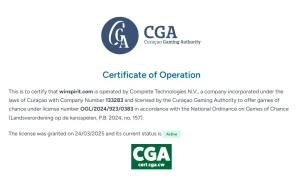
WinSpirit is operated by Complete Technologies N.V. and the current Curaçao Gaming Authority certificate for...

WinSpirit Payment Methods for Australia
Australian WinSpirit accounts can use AUD as an account currency. Confirmed payment methods include Visa...

WinSpirit Mobile Casino and App Experience in Australia
Australian users can access WinSpirit through a mobile browser, and the current official site exposes...
WinSpirit Bonuses and Promotions in Australia
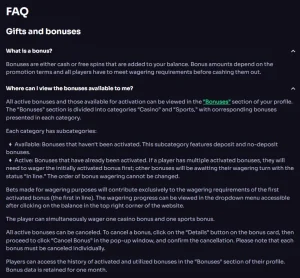
WinSpirit has a welcome offer for Australian users, and the live account provides the most...
WinSpirit Registration and Account Setup for Australia
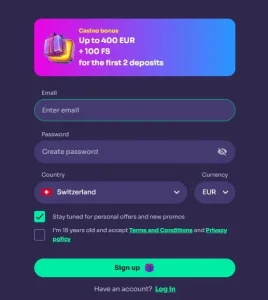
Australian users who choose to create a WinSpirit account should begin at the verified official...